
 Use Diagnostic Charge to charge a battery installed and connected in a vehicle using test parameters determined by vehicle VIN or year, make, and model of the vehicle being tested.
NOTE: An In Vehicle Test will always associate the in-vehicle battery with the VIN of the vehicle in which it is installed.
At any time during the test, tap  to return to the previous screen; or
  to return to the Main Menu.
Battery Test
1. Start your battery test by connecting the Tester Pod test clamps to the battery (Black to negative [–], Red to [+]).
2. At the Main Menu, tap Diagnostic Charge.
3. Select the user running the test and whether the test being performed is In Vehicle or Out of Vehicle.
4. Confirm if there is a customer complaint related to the battery being serviced.
5. Once you have made your selections, it will advance to either retrieve the VIN List if you selected In-Vehicle, or the battery specifications screen if you selected Out of Vehicle. Select the vehicle being tested if applicable.

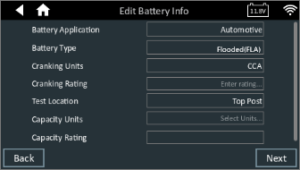
6. If you selected In Vehicle test, it will advance you to the edit battery screen to confirm the battery specifications. If you selected Out of Vehicle, you will be prompted to fill in the battery specifications. Select Next to continue.
7. The diagnostic charge will begin and provide progress updates on screen as the test progresses.
8. The next screen will either be an extended charging mode screen or the results screen if the diagnostic charger is able to come to a decision in its upfront steps.
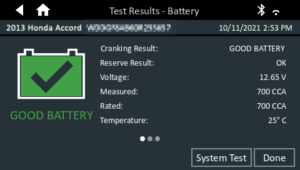
In Vehicle Example Result:
Out of Vehicle Example Result:
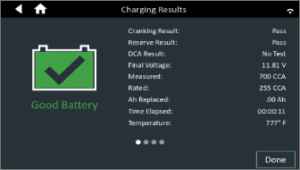
Icons are color-coded to indicate status:
- GREEN: All test parameters were completed and have passed
- RED: The battery has failed the test
- YELLOW: Some test parameters may require further testing
- WHITE: Insufficient date to perform the test
NOTE: Refer to the Test Results Decision Tables article for a complete definition of possible test results.
9. You can select Done to send the results to the server, or select System Test to perform a check on the starter system.
System Test
1. Start the engine and let it idle.
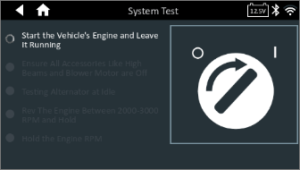
2. Turn off all electrical accessories such as headlights and the interior ventilation blower fan and tap Next.
3. The analyzer tests the alternator output at idle.
4. When prompted, rev and hold the engine to between 2000 to 3000 RPM and tap Next. The analyzer tests the alternator output again.
5. When prompted, return the the engine to idle.
6. Turn on the high beam headlights and interior ventilation blower motor and tap Next.
7. The analyzer tests the alternator output at idle.
8. When prompted, rev and hold the engine to between 2000 to 3000 RPM and tap Next.
9. The analyzer tests the alternator output again.
10. When prompted, turn off all loads and idle the engine.
Tap Next to display the test results.
System Test Results – Summary
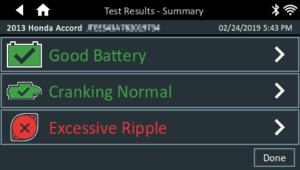
A Test Results – Summary screen is displayed following a System Test. Tap

to view detailed test results for each part of the test.
NOTE: Refer to the Test Results Decision Tables for a complete definition of possible test results.
To return to the Home Screen, tap Done or to return to the Main Menu.